We’ve had ARM-based mini-notebooks and tablets for years and in recent months we’ve even had the chance to test out some new, high-powered arrivals. The
Netwalker,
Wirelession 1060,
TouchBook and
many more. The potential has always been there to make a killer product but no-one has executed correctly yet. The
Mobinnova Beam gets close but there’s a lot missing from the OS on that one.
The
Dell Mini 5 and
Apple iPad might change that and in the world of 4-10” ultra-mobile devices are likely to be the biggest sellers this segment has seen for at least the last 5 years. They combine some unique features over X86 devices that I discuss below. These niche-market devices may not see multi-million sales but there are still big opportunities.
Up at the 10” netbook segment though there’s a well-established market for low-cost, portable, low-end internet-focused mini laptops. Netbooks have 40 million or more sales to-date and
over 100 million sales predicted for 2013. Prices are low, battery life high, performance acceptable and even style is playing a role. Netbooks are just cool and very easy to justify. This is where ARM partners have a superb opportunity…in the Social Netbook.
ARM-partners aren’t in the netbook game yet but they do have a big chance if they use some unique weapons that Intel will have to think carefully about in their next-gen netbook platform. The ‘Social Netbook’ is a huge opportunity for ARM partners.
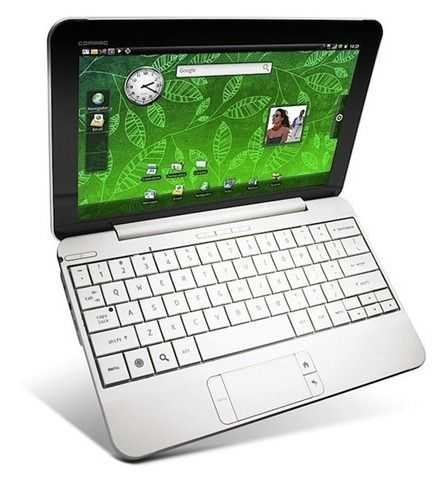
For the first time this week I finally saw an ARM-based netbook that executes well on what I think are the important unique and ‘lock-in’ features and the device slots neatly into a category of ‘social’ netbooks. Jolicloud beware because the
Compaq Airlife 100 is good.
The 4 ARM-Centric Features of a Social Netbook.
1 – Point of sale
First of all we have the point-of-sale element. Selling applications, books, videos, music and other online services adds value to the customer and value to the sales-chain which, in turn, can bring the price of a product down. Android, iPhone OS and other ARM-centric operating systems have proven that the model works and is important for the future. Windows-based netbooks aren’t POS devices. Intel and Nokia are working on this via their Intel Atom Developer Program and app-store framework but it’s in it’s infancy and needs a lot of marketing, development and commitment from OEMs before it becomes interesting for developers and customers. Point-of-sale is a lock-in feature.
2 – Location Based Services and Social Networking
LBS is becoming very big business and customers are starting to catch on to the idea of local search, local social networking and other location-based services. There ARE solutions for Windows-based netbooks but they are few and far between. Take Google Buzz for instance. The only way you can use the location aspect of this service is to use it on an ARM-based smartphone. Windows just doesn’t lend itself to these services and despite efforts to include ‘sensor’ support in Windows 7, developers are just not developing with this in mind. All the action for LBS is exclusively on ARM-based platforms using operating systems built with this in mind. Intel and Nokia do have a solution in MeeGo but like the Intel Atom Developer Program, it’s a long way away from developers minds right now. LBS is a lock-in feature.
As for social networking, although the majority of it still happens on the desktop, the growth in mobile social networking is phenomenal and combined with LBS is something that an Intel/Windows netbook just can not do right now.
3 – Dynamic User Interfaces.
What’s more interesting? A static workbench or a tailored ‘active’ screen with dynamic wallpaper, active widgets, finger-attractions, location awareness and a neat integration and interleaving of notifications from device and external services? Despite Windows 7 being capable of all these things, it’s not delivering a dynamic, exciting, social-centric experience. How many usable finger-centric overlay packages did you see for Windows 7? What platform are developers looking at when they want to make a dynamic, mobile friendly UI? The answer is simple. Most of the work is going into ARM-focused operating systems right now and you only have to look to peoples reaction to ‘Sense’, the UI layer from HTC to see what a difference it makes. Funnily enough, Windows Phone 7 Series won’t be offering tailored overlay layers either so in terms of dynamic, evolving mobile user interfaces, Android is in the best position possible. Again, MeeGo is tackling that issue but again, it’s a long way away from developers minds right now. Dynamic user interfaces are a lock-in feature.
4 – Always on.
I’ve left the best until last. Always-on is a killer lock-in feature and the primary trojan horse for ARM-based products. Always-on is not about in-use battery life, it’s about staying connected and active when you don’t use the device. It’s the smartphone usage model and it’s the reason that many of us, despite having laptops with us, will choose to browse the web or do an email on a smartphone rather than on a mobile computer. We’re simply lazy.
I first experienced this always-on computing model with a productive device
back in 2008 with the WiBrain i1 which was able to achieve a nearly all-day connected usage scenario but it got hot, was a little temperamental and was hardly the most attractive design. Since then we’ve started to see netbooks achieving a regular 8-hour connected battery life and we’re moving to the point where that is going up to 10 hours with designs based around Pinetrail and Menlow but they are all 1.2KG or more, all have huge 6-cell (expensive) batteries and all use an operating system and platform that aren’t designed for the out-of-use scenario. With the current mobile operating systems you get always-on in a much more efficient manner (expect connected active-standby times in days on an ARM netbook) and the OS is designed for that usage model too. From core OS functions to notifiers and the ability to light lamps and buzz buzzers when necessary – even based on location. Users understand these OS’ as ‘always-active’ whereas with Windows 7, users are associating a desktop usage model and power-down after use.
Always-on usage is one of the best advantages ARM-partners have in this space and the primary lock-in feature for ARM-based netbooks.
And…
Also worth thinking about are casual gaming, in-use battery life advantages, weight, design flexibility (smaller, fanless designs) carrier channels and subsidization models.
umpcportal.com